WhatsApp Safety — Lock Down Your Account and Spot the Scams
WhatsApp is where India talks — and increasingly, where India gets scammed. Because you trust messages from people you know, a hijacked account or a well-worded stranger can do real damage before anyone realises. The defences are simple, and mostly free. Here's how to lock your account and recognise the scams.
First: the two settings that stop most trouble
1. Turn on two-step verification
This is the single most important thing you can do. Two-step verification adds a 6-digit PIN that's required to register your number on a new device — so even if a scammer tricks you into sharing the SMS OTP, they still can't take over your account.
WhatsApp → Settings → Account → Two-step verification → Turn on.
Choose a PIN you'll remember (not your UPI PIN), and add your email for recovery.
2. Never share your WhatsApp registration code
The most common account-hijack works like this: a scammer (often from a hacked friend's account) messages "I accidentally sent my verification code to your number, please forward it". That 6-digit code is your account's registration code. Forward it and they register your number on their phone — locking you out and then scamming your contacts as "you".
Your WhatsApp code is never for anyone else. WhatsApp never asks for it, and no friend genuinely needs you to forward a code. Never share it — and with two-step verification on, even a leaked code isn't enough.
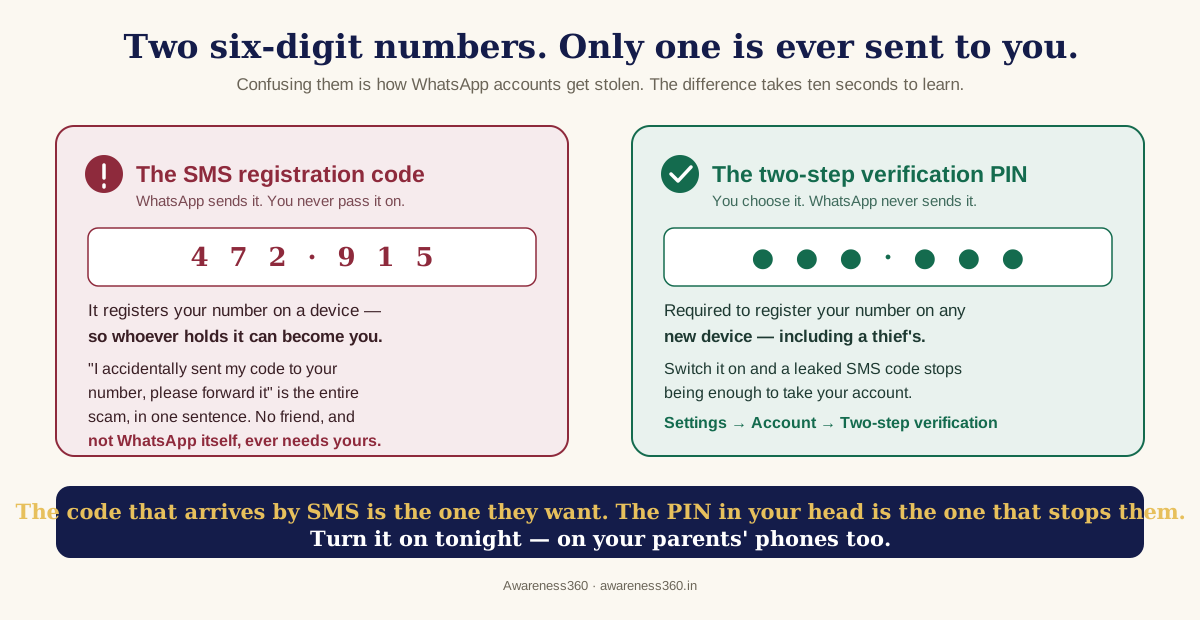
The confusion between these two numbers is the entire vulnerability, and it survives because both happen to be six digits:
- The SMS code is an event, not a secret you keep. It arrives because someone, somewhere, is registering your number on a device right now. If that someone is not you, the code is the only thing standing between them and your account.
- The two-step PIN is a secret — and there is no legitimate flow in which you type it anywhere but your own phone. Which makes any message asking for "your WhatsApp PIN" a scam by definition, with no judgement call required.
- An unexpected code is itself the warning. If a registration code arrives out of nowhere, nothing has been stolen yet — but somebody is trying. That is the moment to switch on two-step verification, not afterwards.
The scams doing rounds in India
The "hi mum / hi dad" money trick
A message from an unknown number: "Hey, this is my new number — my phone broke. Can you urgently pay this bill / send money, I'll return it tonight?" The tone is family; the number is new. Real relative or not, verify on their old, saved number before sending a rupee. Agree a family code word for genuine emergencies.
Investment and "task" groups
You're added to a group promising daily stock tips, or messaged about "part-time jobs" paying you to like videos or leave reviews — with small early payouts to build trust, then a demand to "deposit to unlock earnings". These are the same investment/task-fraud scripts that cost Indians thousands of crores. No genuine job asks you to pay to get paid.
Malicious files and APKs
A wedding invite, an "electricity bill", or a "courier update" arrives as an APK file or a link. Installing it can hand a scammer access to your phone, OTPs and banking apps. Never install apps from chat attachments — only from the Play Store / App Store.
Fake verification and "your account will be blocked"
Messages claiming your WhatsApp will be "deactivated" unless you click a link or share a code are phishing. WhatsApp communicates inside the app, not via panic links.
Lock down your privacy settings
| Setting | Where | Why |
|---|---|---|
| Two-step verification | Settings → Account | Blocks account takeover |
| Profile photo → My contacts | Settings → Privacy | Stops strangers copying your photo for fake profiles |
| Silence unknown callers | Settings → Privacy → Calls | Cuts spam and scam calls |
| Groups → My contacts | Settings → Privacy → Groups | Stops strangers adding you to scam groups |
| Last seen / online → contacts | Settings → Privacy | Reduces what strangers can learn about you |
| App lock (fingerprint) | Settings → Privacy → App lock | Protects chats if your phone is unlocked |
Check who else is reading your messages
Account takeover is loud — you get locked out. The quieter risk is someone reading alongside you, and two settings cover it.
Linked devices. WhatsApp Web and desktop sessions stay logged in for a long time, and anyone with brief access to your unlocked phone can link their own device in seconds. Open Settings → Linked devices and look at the list. Every entry shows the platform and when it was last active. If you do not recognise one — or you see a session from a shared or office computer you forgot about — log it out immediately. Make this a monthly habit; it takes ten seconds.
Your backup is the weak link. Your chats are end-to-end encrypted in transit, but the backup sitting in Google Drive or iCloud is not end-to-end encrypted unless you switch that on. Anyone who gets into your cloud account can read the backup even though they cannot read the chats. Turn on Settings → Chats → Chat backup → End-to-end encrypted backup, and set a password or key you will not lose — there is no recovery if you forget it. While you are there, secure the cloud account itself with two-factor authentication, since that account protects far more than WhatsApp.
Fake brand support and business accounts
A growing share of WhatsApp fraud does not impersonate a person at all — it impersonates a company. You post a complaint on social media about a bank, an airline or a delivery app, and within minutes a "support executive" messages you on WhatsApp offering to resolve it. They are watching public complaints precisely to do this.
- A green tick means a verified business account — its absence is a strong signal, but its presence alone is not proof of anything about the person messaging you.
- Genuine support never asks for your OTP, UPI PIN, card CVV, or for you to install a screen-sharing or "remote support" app. That request is the scam, every time.
- Never use a number someone messages you from. Go to the company's official website or app and use the contact details published there.
- Beware the refund reversal. "We'll refund you — just approve this request" is a collect request that takes money out, not a refund coming in.
If your account is hijacked
- Re-register your number on WhatsApp — enter the SMS code sent to you. This logs the scammer out (a phone number can be active on only one WhatsApp account).
- If you can't get back in, email support@whatsapp.com from your registered address.
- Warn your contacts (via calls or another app) not to send money or click links from your account.
- If money was lost, call 1930 and file at cybercrime.gov.in.
- Turn on two-step verification the moment you regain access.
Spend ten minutes tonight enabling two-step verification on your parents' and kids' phones, and set a family code word. Most WhatsApp scams work by targeting the least protected person in a family — close that gap.
Frequently asked questions
Can someone read my WhatsApp messages remotely?
Not the messages in transit — those are end-to-end encrypted. The realistic risks are different: a device linked under Settings → Linked devices that you did not authorise, a cloud backup that is not end-to-end encrypted, or spyware installed on the phone itself, usually through an app the victim was persuaded to install. Check linked devices, turn on encrypted backup, and never install apps sent through chat.
Someone is using my photo on a fake WhatsApp account. What can I do?
Report the account inside WhatsApp (open the chat → Report), warn the contacts likely to be targeted, and set your profile photo visibility to My contacts so the photo cannot be harvested again. If the fake account is being used to ask people for money, file at cybercrime.gov.in — impersonation used to cheat is a criminal offence, not merely a platform violation.
I shared my 6-digit code by mistake. What now?
Act immediately. Re-register your number on WhatsApp using the fresh SMS code — a number can be active on only one account, so this logs the scammer out. Then turn on two-step verification, and warn your contacts through calls or another app not to act on any message sent from your account in the interim. Speed matters: the damage happens in the window while they are messaging your contacts as you.
Is two-step verification the same as the SMS code?
No, and the distinction is the whole point. The SMS code is sent by WhatsApp when a number is registered on a device — that is the one scammers try to get you to forward. The two-step verification PIN is a separate 6-digit number that only you know and that WhatsApp never sends. With it on, a leaked SMS code is not enough to take over your account.
Can strangers add me to groups without my permission?
You can prevent it. Under Settings → Privacy → Groups, set who can add you to My contacts — strangers then have to send an invite you can decline. This closes off the most common entry point for investment and "task job" scam groups, which rely on mass-adding numbers.
Do disappearing messages make me safer?
They reduce what sits on a device long-term, which has some value if a phone is lost or seized. They do not protect you from the person you are chatting with — anyone can screenshot, photograph the screen, or forward before the message disappears. Treat it as tidiness, not security.
Are WhatsApp payments safe?
They run on the same UPI infrastructure with the same PIN protection, so the platform is not the risk — the social engineering around it is. Every rule from UPI applies unchanged: your PIN is only ever needed to send money, never to receive it, and any "approve this to get your refund" request is a collect request draining your account.
My parent's account was hijacked and it's messaging the family. What do we do?
Get them to re-register their number immediately, which logs the scammer out, then enable two-step verification the moment they are back in. Meanwhile, tell the family group by voice call — not by message — that any money request from that account is fraudulent. If anyone has already paid, call 1930 straight away; the first hour is what determines whether the money can be frozen.
The bottom line
WhatsApp safety comes down to a few habits: two-step verification on, your registration code shared with no one, money requests verified on a known number, and files installed only from official stores. Do those, tighten your privacy settings, and the trust that makes WhatsApp useful stops being the thing that gets you scammed.
How this guide is made
Written and fact-checked by the Awareness360 editorial team from primary sources — RBI, SEBI, IRDAI, the Income Tax Department and Government of India portals — with links to the originals in the text above. Last reviewed on 12 Aug 2026. This is general educational information for Indian readers, not professional financial, legal or tax advice.
Spotted something out of date? Tell us and we'll correct it — see our editorial policy.